![Humanitru-logo-green-horiz-lo-rez-web-main-RGB-3.png]](https://kbhelp.humanitru.com/hs-fs/hubfs/Humanitru-logo-green-horiz-lo-rez-web-main-RGB-3.png?height=40&name=Humanitru-logo-green-horiz-lo-rez-web-main-RGB-3.png)
The Prospects view uses AI to identify high-value cultivation opportunities across eight distinct segments combining engagement level with constituent lifecycle stage. This guide explains each segment and how to interpret segment characteristics.
When to Use This GuideUse Prospect segments to identify major gift candidates, build targeted cultivation lists, and plan strategic outreach by constituent lifecycle and engagement level.
What Are Prospect Segments?
Prospect Segments are AI-generated categories that combine two key dimensions: Engagement Level and Constituent Lifecycle Stage. This creates eight distinct segments, each representing a unique cultivation opportunity.
Engagement Level: Measures how actively a constituent interacts with your organization (email opens, event attendance, website visits, social media). High engagement indicates warm prospects; low engagement suggests need for re-engagement.
Constituent Lifecycle Stage: Classifies prospects as donors, members, or neither—and whether they are active or lapsed. This determines the type of outreach needed.
The Eight Prospect Segments
1. Engaged Non-Donors: Constituents actively engaged with your organization (open emails, attend events, visit website) but have never given financially. These are warm prospects ready for a first solicitation. Strategy: Invite to leadership opportunities, create entry-level giving options, personalized ask.
2. Engaged Non-Members: Active constituents who engage regularly but are not members. Likely event attendees or email subscribers. Strategy: Introduce membership benefits, membership pricing options, or member-exclusive experiences.
3. Engaged Lapsed Donors: Previously gave but haven't recently; however, they remain engaged through emails, events, or website activity. These are re-engagement opportunities. Strategy: Reconnect with impact stories, recognize past support, invite to special events.
4. Engaged Inactive Members: Hold an active or recent membership but show declining engagement. At risk of lapsed membership. Strategy: Membership renewal outreach, member-exclusive content, event invitations to re-engage.
5. Curious Non-Donors: Not currently engaged (low email opens, no events) but show sporadic interest (occasional website visits, social media likes). Low-engagement prospects. Strategy: Welcome/re-engagement campaigns, low-barrier giving options.
6. Curious Non-Members: Minimal engagement but expressed some interest. Have not given or joined. Strategy: Awareness campaigns, event invitations, educational content.
7. Curious Lapsed Donors: Previous donors but now both inactive and disengaged (low engagement signals). Cold prospects. Strategy: Win-back campaigns, address barriers, simplify re-engagement path.
8. Curious Inactive Members: Held membership but are both inactive members and disengaged. Highest churn risk. Strategy: Urgent renewal outreach, address concerns, special reactivation offers.
Accessing the Prospects View
- Navigate to Donor Insights.
- Select Prospects from the Donor Insights sub-sections.
- The Prospects interface displays all eight segments as cards or a list.
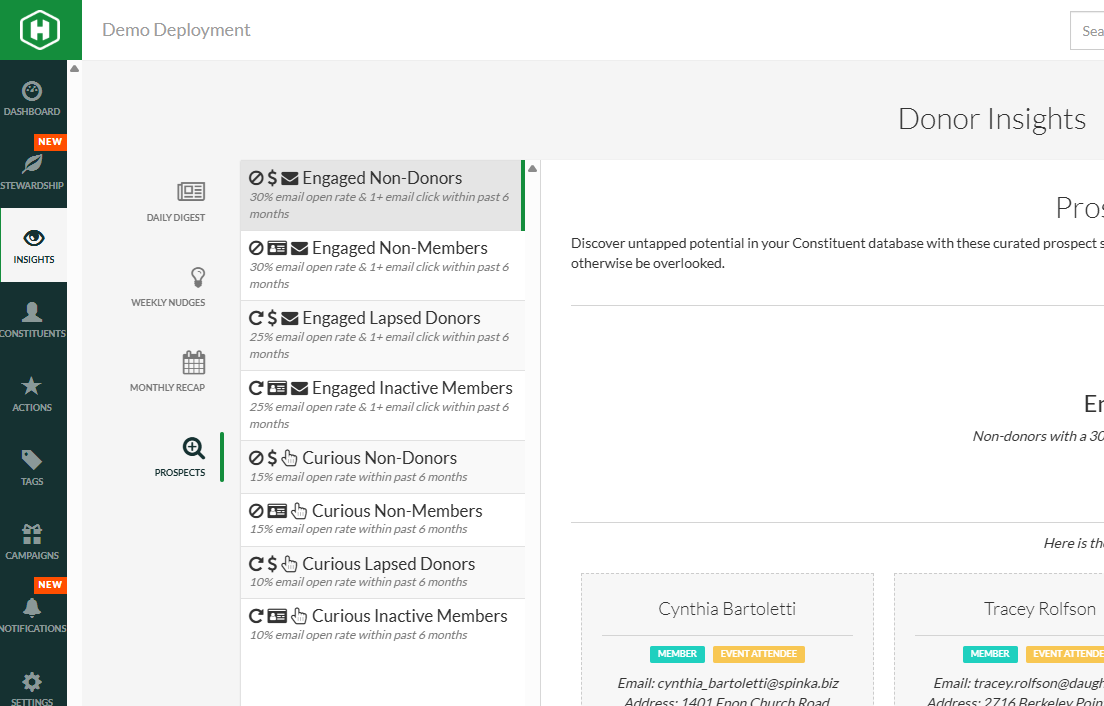
Prospects interface showing eight segments
Interpreting Segments
Each segment displays:
Segment Name: The segment category (e.g., Engaged Non-Donors).
Count: Number of constituents in this segment.
Email Engagement Criteria: A note on what email engagement rate qualified constituents for this segment (e.g., 'open rate 25%+').
Brief Description: A one-sentence explanation of the segment.
View [Count] Constituents Button: Clicking opens a report of all members in that segment.
Preview cards: Show sample constituents with engagement context.
Understanding Email Engagement Criteria
Each segment is partially defined by email engagement thresholds:
Engaged Segments: Typically require 25%+ email open rate, showing consistent email interaction.
Curious Segments: Show lower email open rates (< 25%), indicating minimal email engagement.
Email engagement is calculated over the past 90 days of email campaigns, providing a recent snapshot of activity.
Accessing the Segment Description Panel
For detailed information about a segment:
- Click on a segment card or look for an info icon.
- A right-side panel opens showing:
- Full segment description and definition.
- Recommended strategies and messaging angles.
- Example prospects or use cases.
- Integration points (e.g., suggested automation workflows).
Viewing Constituents in a Segment
To access the report of constituents in a specific segment:
- Click the "View X Constituents" button on any segment card.
- A report opens showing all members of that segment.
- Output columns can include: Constituent name, last engagement date, email open rate, engagement score. As in all reports, these may be customized to display relevant information.
- Additional Filters may be applied as needed and the constituents can be added to an email segment, etc.
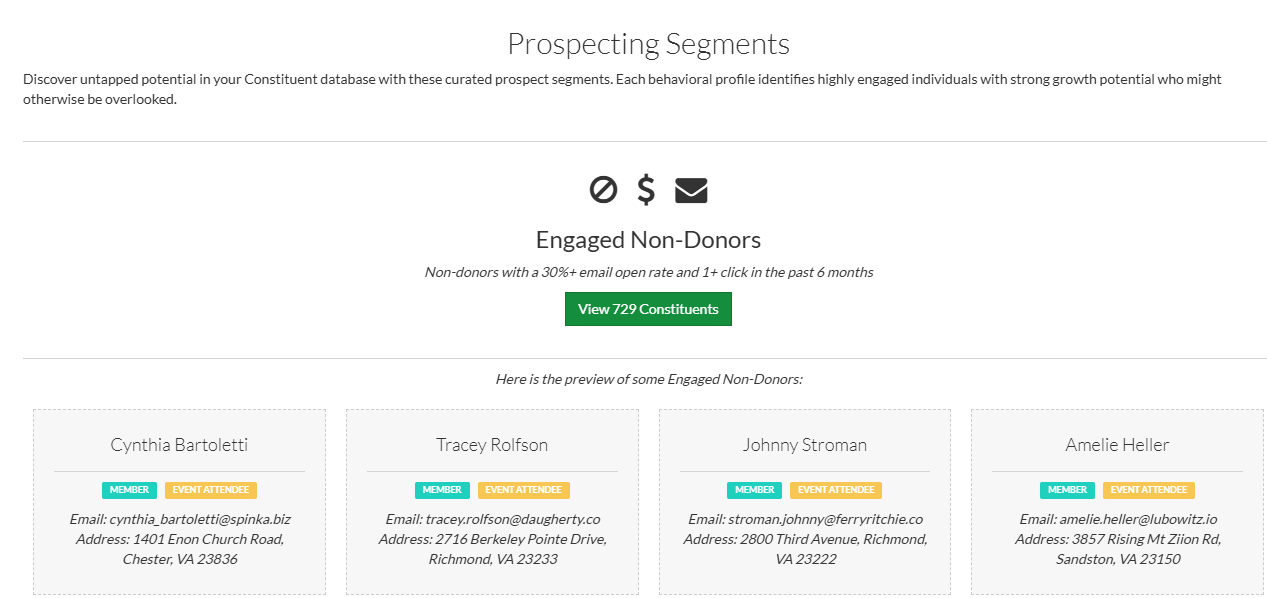
Prospecting segment with preview cards
Using Segment Data for Strategic Planning
Prospect segments support strategic fundraising planning:
- Use the Engaged Non-Donor segment as top priority for acquisition campaigns.
- Track Engaged Lapsed Donor segment monthly as a re-engagement KPI.
- Use the Curious Inactive Member segment to monitor churn risk.
- Build cultivation workflows specific to each segment's recommended strategy.
- Create giving levels that match segment characteristics (e.g., low-barrier entry gift for Curious segments).
Pro Tips
- Sort constituents within a segment in the report tool by engagement score or last engagement date to prioritize outreach.
- Create separate email campaigns for Engaged vs. Curious variants of the same lifecycle stage.
- Review segment sizes monthly—growth in Engaged Donors or decline in Lapsed Donors indicates strategy success.
Common Mistakes
- Using identical messaging across all segments—customize asks based on lifecycle stage and engagement.
- Ignoring the Engaged Non-Donor segment—these are your easiest conversion targets.
- Over-soliciting Curious Inactive Members—focus on re-engagement before asking for renewal.