![Humanitru-logo-green-horiz-lo-rez-web-main-RGB-3.png]](https://kbhelp.humanitru.com/hs-fs/hubfs/Humanitru-logo-green-horiz-lo-rez-web-main-RGB-3.png?height=40&name=Humanitru-logo-green-horiz-lo-rez-web-main-RGB-3.png)
Overview
Blueprints are templated actions that guide you through creating consistent, complete action records. This ensures uniform data entry across your organization.
Part 1: Understanding BlueprintsWhat Are Blueprints?
Blueprints are predefined workflows for common action example types including:
- Donation Blueprint: Guides logging monetary contributions with fund designation
- Event Attendance Blueprint: Streamlines capturing event participation
- Volunteer Hours Blueprint: Simplifies recording volunteer time
- Membership Blueprint: Guides membership sign-ups and renewals
Step 1: Navigate to Actions + Module
- From main menu, select 'Action +'.
- The Actions module dashboard loads.
Step 2: Click Add Blueprint Action Button
- Locate the 'Add Blueprint Action' button in the toolbar.
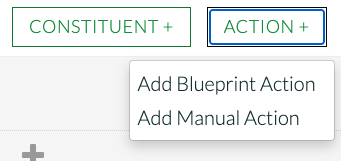
Available blueprint options for guided data entry
- A dropdown of available blueprints appears.
- Select a Blueprint
The blueprint presents fields one or a few at a time in order.
- Read the description.
- Fill in the information as prompted.
- Click 'Save' to complete.

Blueprint workflow showing guided field entry
Part 4: Benefits of Using Blueprints
Consistency
Every user enters the same fields in the same way, resulting in clean, uniform data.
Completeness
Blueprints prompt for all essential information, reducing missing critical details.
Efficiency
Streamlined entry speeds up data entry compared to manual forms.
Training
New team members learn proper data entry procedures through guided prompts.
Pro Tips- Tip 1: Use blueprints for repetitive data entry tasks.
- Tip 2: Blueprints are especially valuable for complex action types like pledges.
- Tip 3: All data entered through blueprints follows standardized formatting.