![Humanitru-logo-green-horiz-lo-rez-web-main-RGB-3.png]](https://kbhelp.humanitru.com/hs-fs/hubfs/Humanitru-logo-green-horiz-lo-rez-web-main-RGB-3.png?height=40&name=Humanitru-logo-green-horiz-lo-rez-web-main-RGB-3.png)
The Monthly Recap provides a rolling month-by-month overview of your organization's fundraising performance with key insights and trend data. This guide explains how to navigate and interpret monthly metrics.
When to Use This GuideUse the Monthly Recap to understand monthly fundraising trends, review year-over-year performance, and identify growth areas or concerns.
Accessing Your Monthly Recap
- Log into Humanitru and navigate to Donor Insights on the left hand sidebar.
- Select ‘Monthly Recap’ from the Donor Insights sub-sections.
- The interface displays the current and previous months' insights.
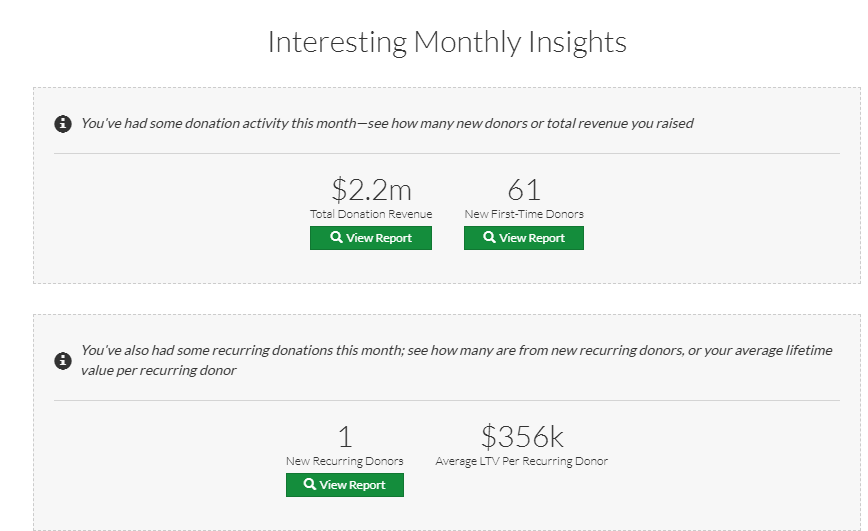
Monthly Recap interface showing monthly insights cards
Understanding the Monthly Insights Cards
The Monthly Recap displays several primary metrics as card-style insights to help you track organizational health and growth:
- Total Donation Revenue: The aggregate amount of all donations received in the selected month. This metric is essential for tracking monthly revenue targets and fundraising performance.
- New First-Time Donors: Count of constituents who donated for the first time in the selected month. This indicates your organization's success in donor acquisition.
- New Recurring Donors: Count of constituents who set up recurring gifts for the first time. This shows commitment and predictable revenue growth.
- Average LTV Per Recurring Donor: The average projected lifetime value of recurring donors, helping you understand the long-term impact of your sustaining donor base.
- New First-Time Members: The number of individuals who joined as members during the month, paired with Total Membership Revenue.
- Lapsed Donors & Members: Tracks constituents who have not given or renewed within a specific timeframe. It also calculates Lapsed Revenue based on the donor's largest previous gift to quantify the financial impact of attrition.
- Email Engagement: Summarizes the reach of your communications, including the number of Email Campaigns Sent, Constituent Recipients, and total Opens and Clicks.
- Volunteer Activity: Tracks growth in your volunteer base, showing New Volunteers and New Added Hours. It also monitors Lapsed Volunteers and Lost Hours to help with retention strategies.
- Weekly Nudge Conversions: Highlights constituents who appeared in Weekly Nudges and subsequently converted by making a transaction, such as a donation, membership payment, or event RSVP.
Selecting a Month to View
The Monthly Recap displays the current month by default, with navigation to view other months.
- You will see the most recent months displayed.
- Additional months can be added by clicking ‘Load More Insights’.
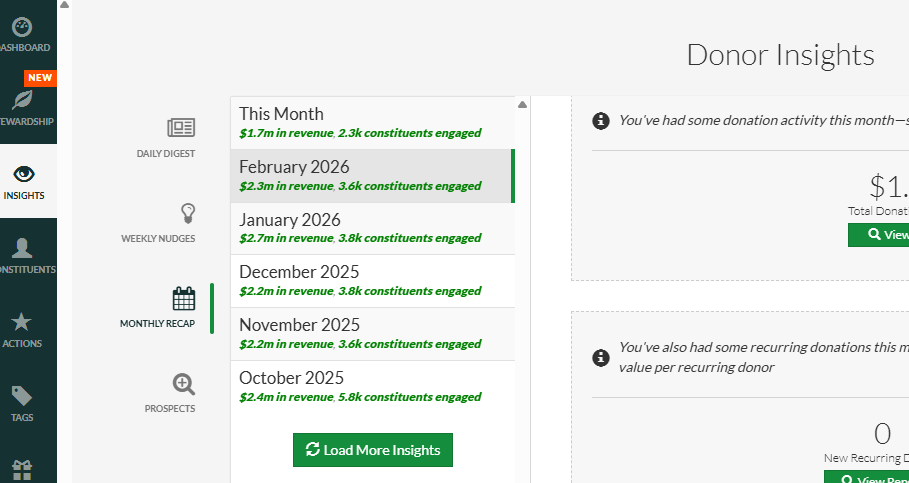
Month navigation controls in Monthly Recap
Interpreting Month-to-Month Trends
Use multiple months of data to identify patterns:
- Steady or growing Total Donation Revenue indicates consistent fundraising performance.
- Seasonal dips (e.g., fewer donations in summer) are normal for many nonprofits.
- Growing New First-Time Donor count suggests successful acquisition campaigns.
- Steady New Recurring Donor acquisition indicates sustainable, predictable revenue.
- Increasing average LTV shows that newer donors are higher-value prospects (successful targeting).
The 'View Report' Button
Each insight card includes a 'View Report' button for deeper analysis:
- Click ‘View Report’ on any metric to open a detailed report page.
- Use Filters in the report to further understand your data.
- Build and execute strategic stewardship plans based upon segments such as First Time Donors, Lapsed Donors, etc.
Benchmarking Performance
Use Monthly Recap to track progress against your annual goals:
- Calculate monthly average revenue by dividing annual revenue goal by 12.
- Compare each month's actual performance against the monthly average.
- Monitor New First-Time Donor count to assess whether acquisition is on pace.
- Track New Recurring Donors—increasing this number stabilizes future revenue.
- Review LTV trends—if declining, your donor quality may be shifting.
Pro Tips
- Review Monthly Recap on the first business day of each month to assess the previous month's performance.
- Share Monthly Recap highlights with your board or leadership to demonstrate progress.
- Compare months with similar seasons (e.g., this January vs. last January) to identify year-over-year trends.
- Use Monthly Recap reports to strategically steward first time and lapsing donors, members and volunteers on a consistent basis.
Common Mistakes
- Not accounting for seasonality—some months will naturally be slower due to donor calendars.
- Overreacting to a single month's performance—look at 3-month rolling averages for true trends.