![Humanitru-logo-green-horiz-lo-rez-web-main-RGB-3.png]](https://kbhelp.humanitru.com/hs-fs/hubfs/Humanitru-logo-green-horiz-lo-rez-web-main-RGB-3.png?height=40&name=Humanitru-logo-green-horiz-lo-rez-web-main-RGB-3.png)
Overview
Filtering helps you focus on specific subsets of your actions data. This guide covers using filters to view donations only, actions from certain dates, verified vs. unverified, and combinations of filters.
Part 1: Accessing the Filters PanelStep 1: Open the Actions Module
- From the main menu, select 'Actions'.
- You'll see the full activity feed of all actions.
Step 2: Select Filters
- Locate the 'Filters' on the lefthand side of the screen.
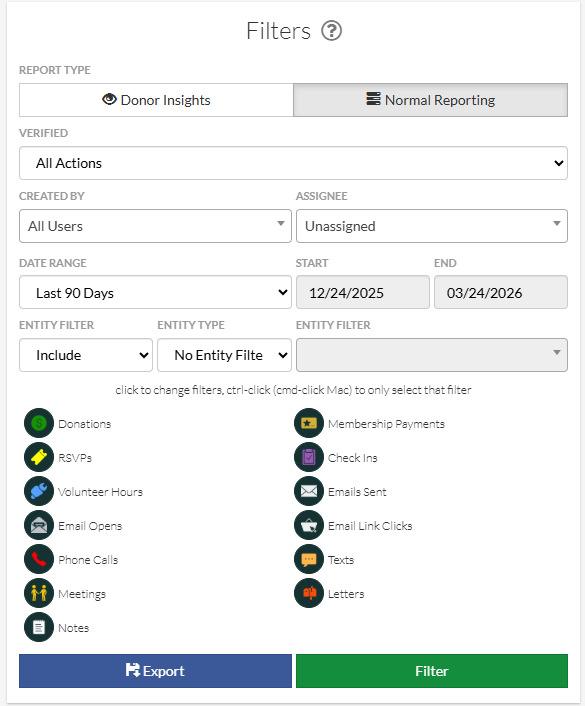
Filters panel with type, date, and status options
Part 2: Filter by Action Type
Scenario 1: View Only Donations
- In the Filters panel, locate the icons for the different 'Action Type' values.
- To change the filters, use ctrl-click (or cmd-click on a Mac) while clicking on ‘Donations’ to select only 'Donations'.
- Click 'Filter'.
- The Action List now shows only donation records.
Scenario 2: View Multiple Specific Types
- Use the Action Type Filters to select 'Donations', 'Membership Payments', and 'RSVPs'.
- Click 'Filter'.
- You will now see transaction based Actions only in the Action List.
Using Predefined Ranges
- Find 'Date Range' in the Filters panel.
- Select from predefined options like 'Last 30 Days', 'Last Quarter', 'Year-to-Date'.
- Click 'Filter'.
Using Custom Date Range
- Select 'Custom' under Date Range.
- Click the 'From' date field and pick a start date.
- Click the 'To' date field and pick an end date.
- Click 'Filter'.
- The Action List shows only actions from that date range.
Verified vs. Unverified
- Find 'Verified' in the Filters panel.
- Options: 'All Actions', 'Only Verified Actions', 'Only Unverified Actions'.
- Select your choice.
- Click 'Filter'.

Results after applying filters to the actions feed
Use Case
Filter to 'Only Unverified Actions' to see upcoming or past due Actions.
Part 5: Combining Multiple FiltersExample: All Unverified Donations from This Month
- Action Type: Donation
- Date Range: This Month
- Verification Status: Only Unverified Actions
- Click 'Filter'.
Example: All Membership Payments from 2025
- Action Type: Membership Payments
- Date Range: Custom 1/1/2026 to 12/31/2026
- Verification Status: All Actions
- Click 'Filter'.
- Tip 1: Combining filters creates powerful views for analysis and reporting.
- Tip 3: Use 'Only Unverified Actions' filter to identify outstanding stewardship actions.