![Humanitru-logo-green-horiz-lo-rez-web-main-RGB-3.png]](https://kbhelp.humanitru.com/hs-fs/hubfs/Humanitru-logo-green-horiz-lo-rez-web-main-RGB-3.png?height=40&name=Humanitru-logo-green-horiz-lo-rez-web-main-RGB-3.png)
Update constituent information by editing information on their profile. This guide walks you through the editing process.
Part A: Opening a Constituent Profile- Navigate to the Search bar.
- Search for or locate the constituent you wish to edit.
- Click on the constituent's name to open their full profile.
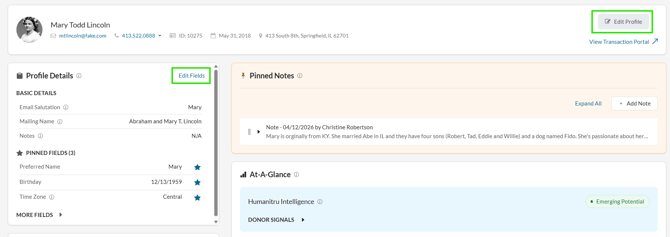
- Select “Edit Profile” from the upper right hand corner of the screen or “Edit Fields” from the Profile Details section.
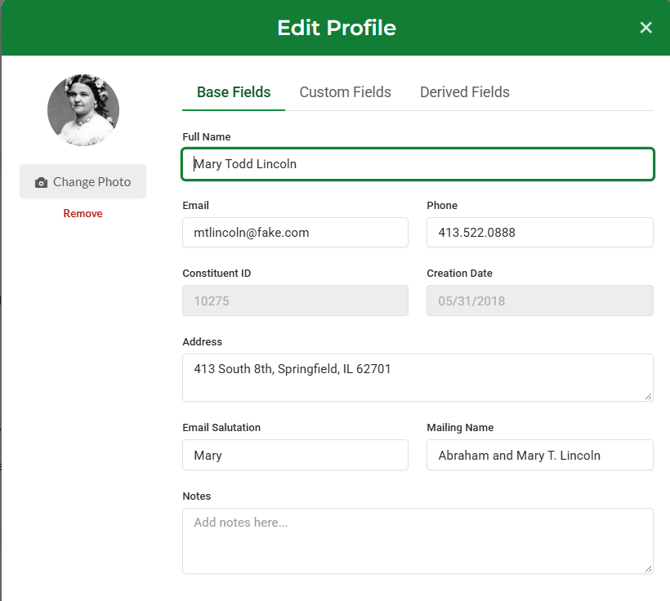
- Click on the field you would like to update (name, address, email, etc.).
- Click the save button (icon) in the lower right hand corner to commit your changes to the database.
Editable Fields
- Contact information: name, email, phone, address
- Organization details: company, title, department
- Custom fields: user-defined fields specific to your organization
- Personal notes: internal comments and reminders
- Pro Tip 1: Changes are saved immediately when you click Save—there's no unsaved work warning