![Humanitru-logo-green-horiz-lo-rez-web-main-RGB-3.png]](https://kbhelp.humanitru.com/hs-fs/hubfs/Humanitru-logo-green-horiz-lo-rez-web-main-RGB-3.png?height=40&name=Humanitru-logo-green-horiz-lo-rez-web-main-RGB-3.png)
Every stewardship touchpoint in Humanitru includes a THEN section where you choose the delivery channel. This is the action that occurs when the trigger fires. This guide explains all four delivery channels and helps you choose the right one for each use case.
When to Use This GuideUse this guide when setting up the delivery action for a new or existing touchpoint and deciding between Email, SMS, Letter, or Profile Note.
Step-by-Step InstructionsPart A: Access the Delivery Channel Selection
- Navigate to Stewardship and click Configure on the touchpoint you want to edit.
- Scroll to the THEN section of the configuration modal.
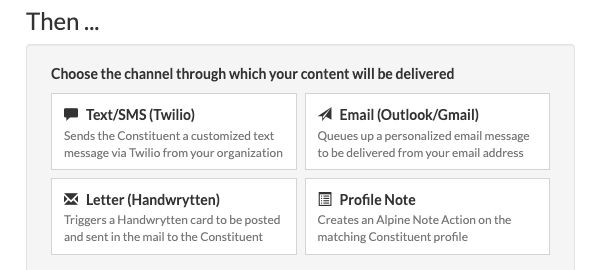
THEN section with delivery channel dropdown expanded
Part B: SMS Channel
- Select SMS to send a text message to the constituent's mobile number on file.
- Compose your message in the text field. Keep messages under 160 characters for single-segment delivery.
- Note: SMS delivery requires an active Twilio integration. If Twilio is not configured, the SMS will fail to deliver.
Best for: Time-sensitive notifications, event reminders, and quick personal touches.
Part C: Email Channel
- Select Email to send an automated email to the constituent when the trigger fires.
- Customize the subject line and body. Use merge fields like {First Name}, {Last Name}, and {Gift Amount} to personalize the message.
- Preview the email to verify formatting and merge field placement before saving.
Best for: Thank-you messages, donation acknowledgments, milestone celebrations, and renewal reminders.
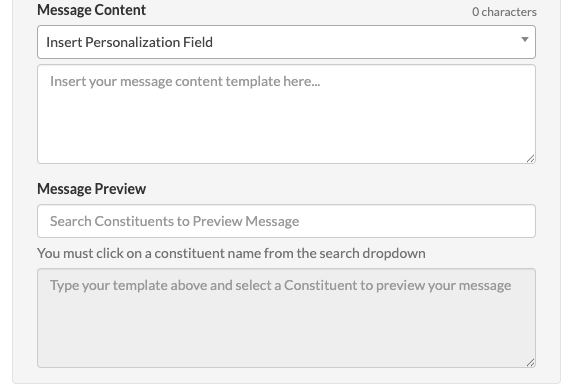
Part D: Letter (Handwrytten)
- Select Letter to trigger a Handwrytten card to be sent in the mail to the Constituent.
- Note that there is an additional card based on the chosen Handwrytten card.
- Select a card type, font, and insert personalization fields
Best for: Major donor follow-ups and high-touch stewardship actions.
Part E: Profile Note
- Select Profile Note to log a note directly to the constituent's record without sending any external communication.
- Write the note content. This note will appear in the constituent's Actions feed.
Best for: Tracking milestones internally, documenting automated events for audit purposes, and building the constituent's engagement history without external contact.
Pro Tips / Common Mistakes- Use Email for broad-based stewardship (e.g., all first-time donors) and Task for high-value, relationship-driven touchpoints (e.g., $10,000+ milestones).
- Always verify that your Twilio integration is active before setting SMS as a delivery channel. If the integration lapses, SMS touchpoints will fail silently.
- Combine channels by creating multiple touchpoints for the same trigger with different delivery actions. For example, a $5,000 milestone could send an automated email AND create a staff task for a personal call.