![Humanitru-logo-green-horiz-lo-rez-web-main-RGB-3.png]](https://kbhelp.humanitru.com/hs-fs/hubfs/Humanitru-logo-green-horiz-lo-rez-web-main-RGB-3.png?height=40&name=Humanitru-logo-green-horiz-lo-rez-web-main-RGB-3.png)
Tags help organize and categorize constituents. This guide shows how to apply tags to individual constituent records.
Part A: Opening a Constituent Profile- Navigate to the database.
- Use the Search Bar or locate the constituent you want to tag.
- Click on the constituent's name to open their profile.
- Locate the Tags section on the constituent profile.
- Select “Manage” in the upper right hand corner of the Tags section.
- Use the check boxes to indicate the Tags that should be on the Constituent’s record. Uncheck the box for any Tags that need to be removed from the record.
Adding Tags to a Constituent
- In the Tags section of the profile, locate the "Applied Tag" section.
- Click the Tag button and a dropdown menu will appear.
- Search for or select the desired tag from the list.
- Click on the tag to apply it to the constituent (a checkbox will show).
- Click "Apply".
- The tag now appears in the constituent's tag list.
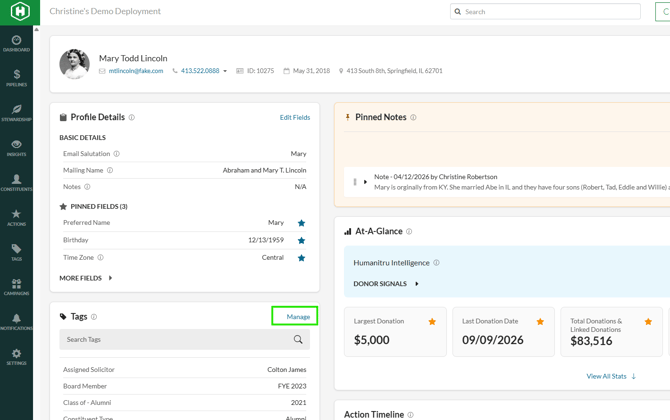
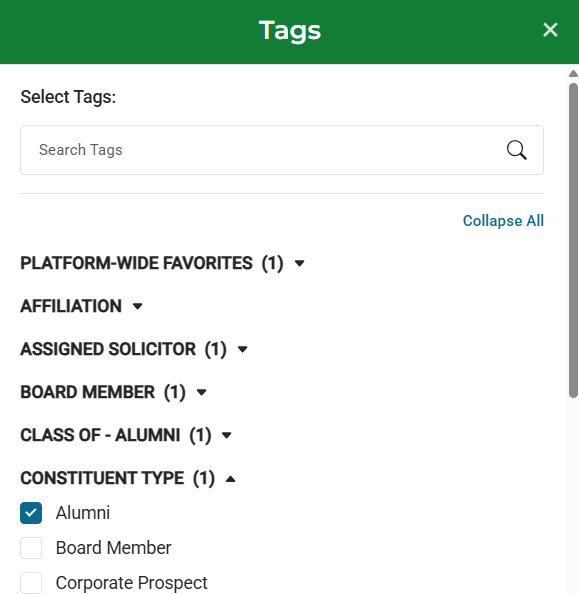
Tag button on constituent profile
Common Tag Examples
- Major Donor: High-value donors
- Monthly Supporter: Recurring monthly gifts
- New Prospect: Recently added constituent
- Board Member: Organization leadership
- Volunteer: Constituent provides volunteer service
- Pro Tip 1: Create a tag naming convention to keep tags organized and consistent
- Pro Tip 2: Use tags to segment constituents for targeted communication campaigns